Prioritizing Messages in the UIS Communication Queue
When you configure a remote device, you must specify which communication device it uses. When you issue get data or send data commands for that remote device, the messages are processed by that communication device and placed in the UIS communication queue. Queue information may be viewed by opening a UIS and right-clicking on a communication device, then choosing one of the available queue options.
Command Priority
Each command can be assigned a priority:
User-Initiated Commands
All user-initiated transactions, such as a command sent from a scripted UIS Command Button on a CygNet Studio screen (using CxUis.UisClient.SendUisCommand or CxScript.GlobalFunctions.SendUisCommand) or a Get data from/Send data to command issued via a Device Editor, take the highest priority in the UIS communication queue; that is, they are always sent to the top of the communication queue.
Scheduled Commands in the MSS
Scheduled command tasks via the MSS, can be configured as to where they are placed in the communication queue. This is specified by the CmdPriority property of the Schedule Task > UIS Command Task. The menu options are Low, Medium, High, User, and Admin. Each higher priority trumps priorities lower than it.
|
Command Priority (CmdPriority) Property in a Scheduled Command Task |
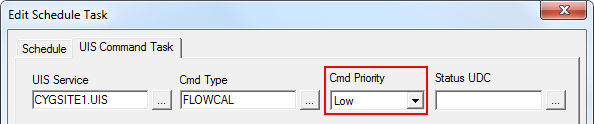
High priority messages are sent to the top of the queue. Low priority messages are sent to the bottom of the queue. The communication device determines the insertion location of Medium priority messages. For example, messages are inserted into the queue first by command priority, and second by first in, first out.
Once a message is sent out, the communication device waits for a response or timeout for the message before moving on to the next message in the queue. You cannot cancel a request once it has been sent out.
A communication device cannot process simultaneous messages, nor can most communication hardware.

